Published: April 19, 2022
| Updated: September 24, 2024
Author: Team Avon
Modern businesses are becoming more equipped against different cybersecurity threats. Now, even small businesses can protect themselves from evolving threats like malware and cloud misconfigurations by simply issuing equipment with antivirus programs.
While cybersecurity issues can be easily fended off with software or an in-house computer technician, companies often overlook the great security risk for businesses today, the human element.
Humans do not run on programs. Sometimes, we make bad decisions or observations that no antivirus software can read. Companies should always consider the physical threats in their security management. Especially now that more employees are returning to the office after a pandemic.
So what are the great security risk for businesses? From tailgating to unauthorized downloads, keep reading to know more.
Security Threats for Your Business
Document Theft
Careless employees might accidentally leave essential documents lying around their desks or anywhere on the business premises. A visitor might accidentally come across confidential information about your company that no other people should know. This type of vulnerability leads to one of the most dangerous security incidents in a company, a data breach.
Tailgating
If you’ve seen too many action movies, you already know the concept of tailgating. Tailgating is when an unauthorized person sneaks behind an authorized person into restricted company areas. If you’re running an office with many employees and visitors coming in and out every day, tailgating is an easy task for malicious outsiders. This outsider can access your company by posing as a visitor and making it through the lobby, waiting for the opportunity to tailgate an employee.
Unauthorized Download
Sometimes, cybersecurity threats happen from within the company. For instance, some employees download unauthorized software or applications, mainly for personal use. IT departments address this by creating a list of company-approved programs and blocking unauthorized ones. Unfortunately, with the vastness of today’s digital world, not all programs can be accounted for on the entire internet. So an employee can find access to unauthorized programs likely linked to malware and other tools for cyber attacks.
Social Engineering Attacks
This type of security threat banks on human error completely, usually involving psychological tactics to create a false sense of urgency to trick unsuspecting individuals. Attackers can target your employees to turn over confidential company details like account information, opening doors for many data security risks.
Some of the social engineering attacks you may encounter include phishing, baiting, scareware, and other severe cyberattacks.
Unaccounted Visitors
One of the simplest yet most dangerous business security risks is unaccounted visitors. Unaccounted visitors may be worse than tailgating because none of your security risks for business management will work if you don’t know who’s in your office at all times. For instance, your security team will have difficulty narrowing people down if an incident happens on the business premises.
How to Keep Track of Your Visitors
Proximity cards for employees and guests are among the best tools against unaccounted visitors. All visitors and employees are accounted for and separated from employees if you have an ID system. And always complement that with a physical entry log to verify a visitor’s time in the office.
Pro Tip
To give your business more security layers, use ID cards with features like UV printing, watermarks, holographic laminate, or features that are hard to replicate by an outsider.
Keep Your Business Safe
Human error and ignorance are among the great security risk for businesses. Fortunately, most of these problems, like tailgating and unaccounted visitors, can be addressed by combining traditional and modern solutions, like an ID system.
Avon Security Products is Canada’s largest photo ID warehouse, offering ID cards, accessories, systems, and printers for all levels of business. Contact Avon Security Products today for the safety of your business.
An employee ID system offers a more secure workplace. Contact Avon Security for ID cards, systems, and printers.
FAQs on The Greatest Security Risks for Businesses
What is a Clean Desk and Clear Screen Policy?
The Clean Desk policy requires employees to remove all sensitive documents and items from all office desks daily, from notebooks to flash drives to business cards. The Clear Screen policy shares the same principle. It requires all employees to lock their computers when leaving their desks for a long time.
What are anti-tailgating doors?
Anti-tailgating doors help prevent unauthorized people from gaining access inside secure areas. These doors work only when authorized personnel use a designated ID programmed to gain access. Anti-tailgating doors will close immediately once the ID holder passes through the doors.
Why should you include photos on employee ID cards?
Photos are essential in an ID card to help security verify the employee as a legitimate member of the company. Plus, it gives the employees a feeling of exclusivity of being a part of an established company.
Published: April 4, 2022
| Updated: September 24, 2024
Author: Team Avon
Over the past decade, technology has started to change the way people run their households and businesses. Enormous advancements in various products are coming swiftly as a lightning bolt. Consumers enjoy more of these in the advent of the IoT era, from computers to mobile phones. It is no surprise that more items can now be upgraded and controlled by electronic devices.
Even the security industry is transforming to keep up with these fast-paced trends. CCTVs, burglar alarms, and badges are some typical security devices at home and in buildings. Sadly, many people forget to update their security systems to ward off intruders. This article will help you know when to upgrade them and how to do it better.
Reasons to Upgrade Security
In general, security upgrades are done every five years. Technology becomes more advanced and continues to accelerate in a heartbeat. You must ensure that the security system side can keep up with the constant changes. Here are the best reasons to upgrade your security:
Older Technology Will Have More Loopholes
Security systems of more than ten years are more prone to loopholes. Experienced burglars or intruders will discover a way to breach them. Keep in mind that these uninvited guests are also studying how locks and alarms work. They may learn how to unlock or disable them quickly. Circuit malfunctions and delays in alarms and security cameras may become more frequent.
Newer Technology Has More Features
Newer technology has more features in line with the current security standards. For example, more systems may require access, which may only authorize the owner or security officers. Door and window locks are more bump-proof and durable.
Better Security
Security upgrades enable owners and security personnel to evaluate buildings and suggest enhancements. They can find loopholes that need to be fixed right away. Better security footage and alarm responsiveness must also be expected. In most offices, the company badge, ID, or prox card must be tapped on keycard systems and turnstiles.
Increased Flexibility
Technology today provides more flexibility, and the security industry is not an exemption. It allows owners and security officers to manage the system when synced with an Android smartphone. They can have total control and watch over the house or building wherever they are.
Tips for Upgrading Security
An outdated security system falters or stops working overtime. Home and building owners should know that security has to improve its IT infrastructure every five to ten years. Technology is evolving, so do burglars and other criminals. But before doing so, these are some home and workplace security tips to remember.
Start Switching to a Cellular-Based Monitoring System
Monitored IT systems may send a distress warning when it detects danger. A dispatcher from the security provider may make a call. Suppose it does not reach the owner or the person who answers the call cannot provide the security password. The dispatcher will call the police.
The problem arises when the intruder cuts the phone lines. That is why many buildings and households are switching to a cellular-based monitoring system. Mobile phones may still connect to the central station even if the phone lines are cut. They may also provide you with signs that it’s time to upgrade your security.
Use Equipment and Devices for Better Security
Surveillance cameras have been pivotal in improving security systems and driving market growth over the years. Today, a high-resolution camera system captures more demand. They are more capable, allowing a three-to-four-week continued video storage. But it comes with a higher cost.
Fortunately, many surveillance cameras can now be monitored on iPhones and Android phones. They store motion-based clips in the cloud or on SD cards for online viewing. These can guarantee a more effective camera performance. Owners can also install apps and connect them to cameras to access live video alerts.
Other Security Equipment
Aside from adding surveillance cameras and cellular monitoring systems, owners can add more sensors. Sensors on doors, closets, and jewelry boxes can further increase security. If these are connected to phones, owners will know if someone goes to a restricted area.
Other devices that can be used are thermostats. They can protect your home by detecting very high or low temperatures. They can prevent potential fire and excessive usage of air conditioning. Consider installing smoke and carbon monoxide detectors as well.
Company Badges
The company badge and ID must now be tapped on keycard entry systems and turnstiles when entering office premises. That way, security personnel will no longer have to check every employee. Employees and visitors cannot enter without it. So, if a company property goes missing, especially during weekends, employers can easily track it.
Warning Signs You Need to Upgrade Security
A building or home security system provides owners comfort and safety. But they may no longer be as effective as they were years before. They even entice more danger. These are the typical warning signs to upgrade your security.
Surveillance Camera Problems
Surveillance cameras may deter intruders from breaking into your home or building. After all, burglars only attack in the shadows. They don’t want to be recognized to avoid imprisonment. But many homes and buildings in the business world often neglect the need to update or upgrade them.
Outdated surveillance camera footage may look worse than sepia-toned films. Some are blurry or in black and white, making it hard to identify culprits. Owners have to update cameras and consider the difference between IP and Analog cameras. Many cameras today may provide a high-definition picture regardless of the wire type.
Owners must also consider the importance of 24/7 monitoring, especially if they are away from home. Mobile phones enhance security on alarms and cameras. Surveillance cameras are now connected to phones. Its video recorder allows owners to watch footage remotely when they go online.
Burglar Alarm Problems
Burglar alarms are often used at home or as part of the art security system. Sensors can be placed on valuable items or doors to detect those who come across restricted areas and items. But, like surveillance cameras, alarms may no longer be effective once they become outdated. Burglars may even find a way to disable them and roam freely in houses and buildings.
The most typical burglar alarm problem is when it starts losing its sensitivity. After many years, the burglar alarm may not be as responsive as before. This may also be a problem for the art security system. Owners may have to update or upgrade it before a burglar breaks into homes and buildings.
Another typical warning arises when you can’t manage it with your phone. Like CCTVs, they can now be connected to mobile devices for 24/7 monitoring. This problem may manifest if alarms are too old or overused. So even if burglars break into your home, you might not get an alert from the alarm.
Also, you may not understand the status messages from your alarm. Probably, it is because the alarm and your phone specs do not match each other. Outdated alarm system keypads communicate using flashing lights. Newer alarm keypads are using LCDs to send updates in plain language. If you still find the messages confusing, you may install more modern alarm panels. It will enable you to identify issues and effectively address them.
Badges, Keycard Systems, and Turnstiles Do Not Work
Keycard systems and turnstiles will not allow entry if the badge or ID tapped do not match. They make loud sounds if someone tries to get past them without tapping his badge. Badges or keycard systems must be replaced or updated if their sensitivity decreases. It will be simpler for burglars to disable the alarms and enter.
Various security systems evolve to keep up with the continued technological advancement. They drive the security side in the modern business world. Enhancing security is now one of the core business tasks. At homes and buildings, they provide more protection against unwelcomed people.
Do you wish to upgrade your security system? If you see the warning signs telling you to upgrade, reach out to Avon Security Products. The company produces quality badges, card printers, and systems to ensure the security of homes or businesses.
FAQs on the Warning Signs That It’s Time to Upgrade Your Security
How much is the average cost of a security system?
The security system may cost from $224 to $648.
Are burglar alarms still effective?
Burglar alarms are still effective in deterring burglars.
What information do badges typically require?
Badges typically display the company name and logo, and employee information.
Published: March 29, 2022
| Updated: October 22, 2024
Author: Team Avon
For years, many believe that ID badges are only for large companies to help monitor hundreds of employees and separate them from visitors. While that’s true before, today, company ID badges are necessary even for SMEs for many reasons.
From security to brand identity, keep reading to know the importance of ID cards and why companies of all sizes need them.
What Are ID Badges and What Are Their Main Purposes?
ID cards are personal documents issued by an organization to verify a person’s membership, like in schools or companies. Because all organizations have exclusivity, IDs help provide members-only access to different facilities, machines, and perks. For instance, employees can access company lounges and get discounts through an ID card.
Finally, ID cards can also help track services quickly through a system where customer data is stored. Service providers can access information quickly and identify the products and services provided using a customer ID.
Why Use ID Badges for your Company?
An ID card and other similar accessories are crucial in the business world for reasons beyond identification.
Some of the key benefits of employee identity cards include:
Security
With modern ID cards, you can restrict people from accessing essential facilities or files that need a high level of clearance to protect your company’s valuable assets from security breaches.
Employee Confidence
ID cards help establish your business as a legitimate player in the industry, boosting employee confidence knowing they work in an established company.
Customer Relations
Wearing an ID card creates a level of authority and employee credibility, especially for your customer service representatives, so that they can strengthen customer trust.
Employee Accountability
You can track the ins and outs of your employees through ID cards. Identify who’s slacking off, who’s coming in late and who’s clocking out early.
Branding
Employees who wear your brand identity outside the office provide a cost-efficient marketing solution that could spark curiosity and, hopefully, an inquiry.
Professionalism
IDs are professional accessories, and implementing regular use is one way to encourage professionalism in the workplace.
Pro Tip
It wouldn’t hurt to use ID badge holders or heavy-duty badge reels to ensure the longevity of identification cards. Don’t worry about decreasing the card’s professional look. It’s the details printed on the ID that carries that effect.
Need to print employee ID badges for your business? Visit Avon Security Products for great ID badge ideas and other helpful information.
Components of An Excellent Employee ID Badge
Before you issue employee ID cards, keep in mind that slapping an employee’s name on an uninspired card won’t provide any of the mentioned benefits. A professional corporate ID badge must have the following elements:
Design that fits branding
Organization logo
High-resolution ID photo
Durable material (PVC or HID smart cards)
Data encoding (using smart chips, barcodes, magnetic stripes, and RFID tags)
Signatures
Personal information
Security elements (fingerprint or holographic overlay) to prevent unwanted replicas
Are You Looking for the Best Employee ID Badge Systems for Your Business?
ID badges in Canada have gone from a simple piece of identification to an accessory that helps heighten a company’s integrity. If you’re looking to achieve the many benefits of employee identity cards, talk to a trusted ID badge maker in the industry!
Visit Avon Security Products for ID badges, systems, and other related products and services. Get to know more about the industry through Canada’s largest photo ID warehouse!
FAQs on Understanding the Importance ID Badges
1. What is the difference between an ID badge and an ID card?
The term “ID badges” is often associated with security use, but ID badges and ID cards are the same.
2. What are the standard security features of an ID badge?
ID badges should have data encoding features like barcodes, smart chips, and magnetic stripes.
It should be hard to replicate, too. So an ID can also feature a hologram or fluorescent overlay only specific to your company.
3. How do I make my ID badge for my small business?
Many ID products and accessories providers offer printing supplies at an affordable price to make employee ID badges. Instead of dealing with many suppliers, you can get them all in one place.
Published: March 14, 2022
| Updated: May 27, 2026
Author: Team Avon
An employee ID card is a workplace identification tool used to verify staff members, support building security, manage access control, and improve daily operations. Modern employee ID cards often include employee information, photos, security features, and integrated technologies that help organizations manage both safety and efficiency.
Employee identification has evolved significantly over the past decade. What was once a simple photo badge is now part of a much larger workplace security and operational system.
Today’s businesses rely on employee ID cards to support everything from visitor management and building access to time tracking, compliance, and staff accountability. Schools, healthcare facilities, offices, warehouses, manufacturing plants, and government organizations all require identification systems that balance professionalism with security.
At Avon Security Products, we help businesses build identification systems that support both workplace protection and everyday functionality. The right employee ID solution should not only identify staff members clearly, but also improve workflow, strengthen security, and support long term operational planning.
At a Glance
Employee ID cards support workplace security, staff identification, access control, and operational efficiency.
A modern employee ID badge should include clear employee information, a professional photo, company branding, and security features.
Many organizations now use smart technologies like barcode systems, RFID, and proximity card access systems.
Durable materials and high quality printing help employee ID cards last longer in busy environments.
Different industries require different ID card solutions based on security, compliance, and workflow needs.
Why Employee ID Cards Matter More Than Ever
Modern workplaces face growing pressure to improve security while maintaining smooth day to day operations.
Unauthorized visitors, shared office spaces, hybrid work environments, and stricter compliance requirements have made professional identification systems increasingly important. Businesses now need identification tools that help employees move efficiently while also protecting sensitive areas and company assets.
A properly designed employee ID card can help organizations:
Verify staff identity quickly and professionally
Restrict access to authorized areas
Improve visitor awareness
Support emergency response procedures
Strengthen workplace accountability
Improve customer confidence and professionalism
Reduce security vulnerabilities
The National Institute of Standards and Technology (NIST) Identity & Access Management Resource Center also highlights the growing importance of secure identity verification and access management in modern organizations.
Employee identification also plays an important role in workplace culture. Clear staff identification creates a more organized and professional environment, particularly in customer facing industries like healthcare, education, retail, hospitality, and corporate offices.
Businesses investing in reliable identification systems often start with scalable solutions like Avon Security Products ID Card Systems that can grow alongside operational and security needs.
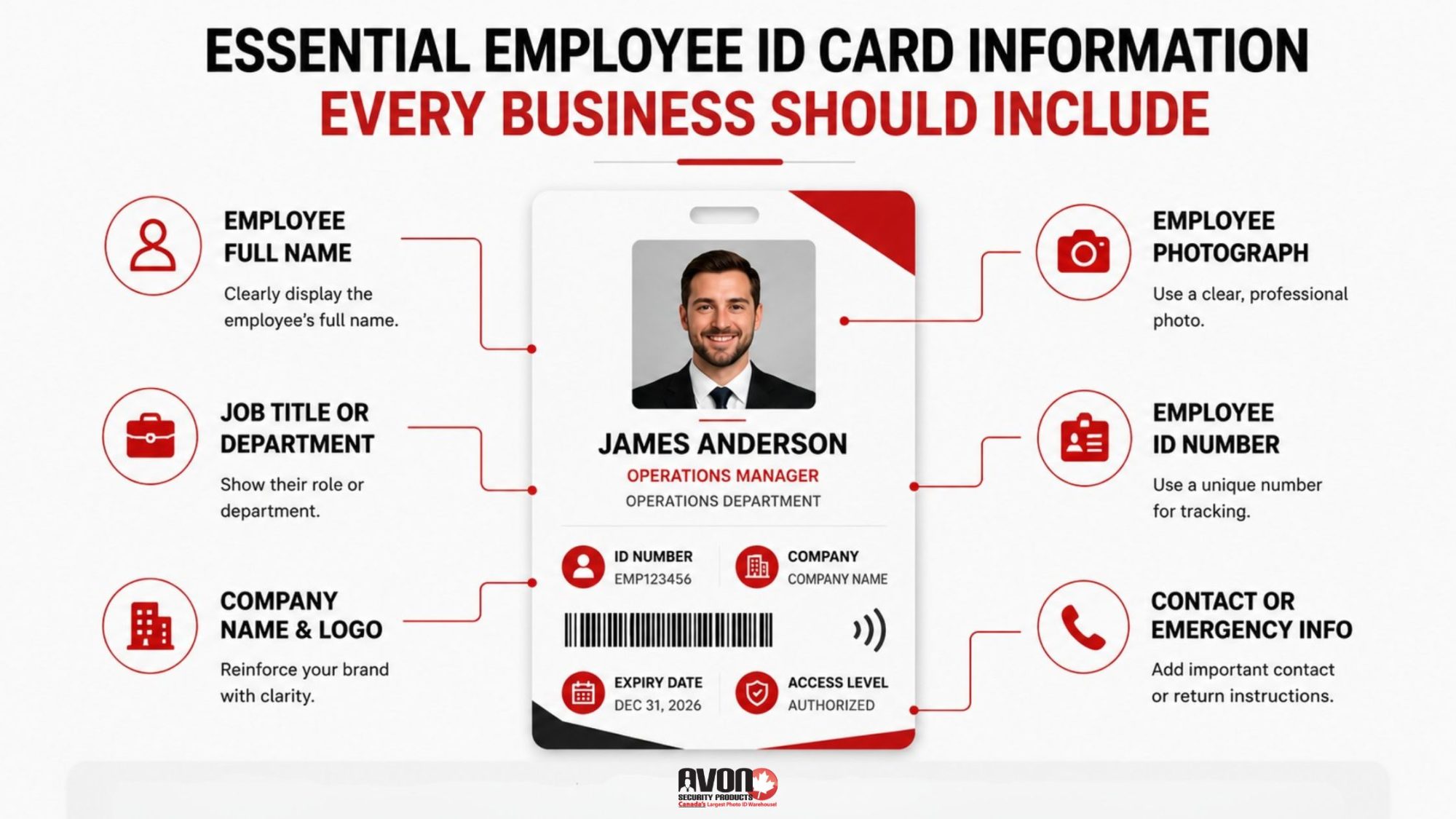
Essential Employee ID Card Information Every Business Should Include
The most effective employee ID cards balance clarity, professionalism, and functionality without appearing overcrowded.
Government organizations across Canada continue to rely on structured identification systems to support employee verification, controlled access, and workplace security procedures, as outlined by the Government of Canada’s Departmental Security ID Card guidelines.
Employee Full Name
The employee’s full name should remain one of the most visible elements on the card. Names should be easy to read from a reasonable distance and printed using clean, professional typography.
Employee Photograph
A professional employee photo adds both security and credibility. The image should be recent, high resolution, and properly lit.
Poor quality photos can reduce the effectiveness of workplace identification, particularly in larger organizations where staff may not know each other personally.
Job Title or Department
Including an employee’s department or position can help improve internal communication and workflow efficiency. This is especially useful in hospitals, schools, warehouses, manufacturing facilities, and large office environments.
Employee ID Number
Many businesses assign unique identification numbers to employees for internal tracking, HR systems, payroll integration, or compliance purposes.
Company Name and Logo
Strong branding creates consistency and professionalism. Company logos should appear clearly without overwhelming the overall design.
Contact or Emergency Information
Some organizations choose to include internal contact information, emergency procedures, or return instructions on the back of the card.
Modern Employee ID Cards Often Include Advanced Security Features
Basic photo badges are no longer enough for many workplaces. Modern employee ID systems increasingly integrate advanced technologies that help organizations control access, monitor movement, and reduce unauthorized entry risks.
Proximity Card Access Systems
Many businesses now use a proximity card to integrate employee identification with physical access control systems.
Employees can tap their cards to access:
Office entrances
Restricted departments
Elevators
Parking garages
Server rooms
Warehouses
Employee only facilities
A well designed proximity card access system helps businesses improve security while minimizing operational friction.
The U.S. General Services Administration explains how modern Physical Access Control Systems (PACS) help organizations manage secure building access, employee authentication, and facility protection more effectively.
Organizations implementing secure workplace access cards often benefit from stronger access management and better workplace visibility.
Barcode and QR Code Integration
Barcodes and QR codes allow businesses to integrate employee ID cards with attendance tracking, visitor systems, inventory management, cafeteria services, and event registration systems.
Holograms and UV Printing
Security overlays, holographic laminates, and UV printing help prevent duplication or tampering.
These features are particularly valuable for government agencies, healthcare organizations, schools, and higher security facilities.
Smart Chip Technology
Some organizations use smart chip enabled staff ID cards that store encrypted employee credentials or support multi factor authentication systems.
Design and Layout Considerations Can Make or Break an ID Card
One of the biggest mistakes businesses make is overcrowding the card layout. An employee ID badge should remain easy to read while still supporting branding and security goals.
Good design is not simply about appearance. It directly affects usability, scanning accuracy, and workplace efficiency.
Keep the Layout Clean
Important information should remain visually organized with clear spacing between elements.
Trying to fit too much information onto a single card can reduce readability and make identification slower.
Use Consistent Branding
Employee identification should visually align with the organization’s existing branding standards.
This includes:
Logo placement
Colour consistency
Typography
Card orientation
Department colour coding where applicable
Prioritize Readability
Names, photos, and access indicators should remain visible even when viewed quickly. This becomes especially important in healthcare environments, schools, manufacturing facilities, and customer service settings.
Photo and Image Quality Should Never Be Overlooked
A poor employee photo can weaken both professionalism and security. Blurry, outdated, poorly cropped, or low contrast images make identification more difficult and can reduce confidence in the badge system itself.
Best practices include:
Neutral backgrounds
Consistent lighting
Front facing positioning
Updated employee photos
High resolution image capture
Standardized cropping
Organizations improving their identification process often combine high quality photography with reliable employee ID card software to streamline badge creation and maintain consistency across large teams.
Security and Durability Features Help Employee ID Cards Last Longer
Employee ID cards experience daily wear. Cards are frequently swiped, scanned, tapped, clipped, carried, and exposed to environmental conditions throughout the workday.
Low quality materials often lead to:
Cracking
Fading
Broken chips
Damaged magnetic stripes
Poor scanning performance
Premature replacement costs
Durable PVC cards, protective overlays, and quality printing equipment help businesses reduce long term replacement expenses while maintaining a professional appearance.
At Avon Security Products, we help organizations choose durable solutions that match their workplace conditions and operational requirements.
Different Types of Employee ID Cards Serve Different Purposes
Different industries often require different security levels, technologies, and workflows.
For example, healthcare organizations often maintain strict badge and access procedures for employees, contractors, students, and visitors, similar to the protocols outlined in this Prairie Mountain Health photo identification and access card policy.
Standard Photo ID Cards
Basic photo identification remains common in offices, retail businesses, and customer service environments.
Smart Cards
Smart cards support encrypted authentication and integrated digital credentials.
RFID and Proximity Cards
RFID enabled staff ID cards are widely used for access control, parking systems, attendance tracking, and building security.
Temporary Visitor or Contractor Cards
Many workplaces issue temporary identification to visitors, contractors, and vendors to improve accountability and reduce security risks.
Modern organizations often benefit from scalable solutions built around technologies like Entrust Sigma printers that support secure, high quality workplace identification at scale.
ID Card Creation and Printing Methods Have Evolved Significantly
Employee ID printing is no longer limited to simple desktop badge creation.
Modern businesses now require systems that support:
Faster issuance
Secure data management
High volume printing
Remote credential management
Access control integration
Visitor management compatibility
According to the NIST definition of Physical Access Control Systems, modern credential systems are designed to control and monitor physical access to protected spaces using authenticated credentials and secure technologies.
Organizations with growing workforces often need professional systems capable of supporting scalable badge production while maintaining security standards.
Businesses evaluating new systems should also understand the risks associated with common ID card printer buying mistakes before investing in hardware or software solutions.
Best Practices and Common Mistakes Businesses Should Avoid
Even strong identification systems can become ineffective if businesses overlook important operational details.
Common Mistakes
Some of the most common employee ID card issues include:
Poor image quality
Inconsistent card design
Weak access control settings
Cheap card materials
Delayed employee updates
Overcomplicated layouts
Lack of security features
Best Practices
The most successful employee ID systems typically include:
Standardized badge templates
Updated employee photos
Durable materials
Controlled printing access
Integrated access control
Clear visual hierarchy
Regular security reviews
Organizations modernizing their badge programs often improve efficiency by adopting modern employee ID printing workflows that reduce manual errors and simplify badge management.
Employee ID Cards Support More Than Security
A well designed employee ID system does more than protect buildings. It improves operational consistency, strengthens professionalism, simplifies employee verification, and supports long term workplace organization.
At Avon Security Products, we help businesses create identification systems that align with both security goals and daily operational needs. From professional ID card printers and badge supplies to software, access systems, and workplace identification planning, our team supports organizations across Canada with scalable solutions designed for modern work environments.
Whether you are building your first employee ID system or upgrading an existing one, the right approach starts with understanding how identification impacts both security and workflow efficiency.
Key Takeaways
Modern employee ID cards support security, access control, professionalism, and operational efficiency.
Clear employee information, professional photos, and durable materials are essential for effective workplace identification.
Advanced features like RFID, barcodes, and proximity systems improve workplace security and access management.
Strong design and layout choices improve readability, branding consistency, and usability.
Different industries require different identification systems based on compliance, workflow, and security needs.
Need Help Choosing the Right Employee ID System?
Whether you need secure staff ID cards, ID printers, access control solutions, or scalable workplace identification systems, Avon Security Products can help you build a solution tailored to your organization.
If you are planning a new identification program or upgrading an existing setup, talk to an ID card specialist to explore the right solution for your workplace.
Frequently Asked Questions
What information should appear on an employee ID card?
Most employee ID cards include the employee’s full name, photo, company logo, department, job title, and employee number. Some organizations also add barcodes, RFID technology, emergency information, or access credentials depending on operational and security requirements.
Why are employee ID badges important for workplace security?
Employee ID badges help organizations verify staff identity, control access to restricted areas, monitor workplace activity, and reduce unauthorized entry risks. They also improve visitor awareness and support emergency response procedures in larger facilities.
What is the difference between a photo ID card and a proximity card?
A standard photo ID card primarily identifies an employee visually. A proximity card includes embedded technology that allows employees to access buildings, doors, elevators, parking areas, or secured departments using electronic access control systems.
What material is best for employee ID cards?
PVC plastic remains one of the most common and durable materials for employee ID cards. High quality PVC cards resist fading, cracking, and daily wear while supporting technologies like magnetic stripes, smart chips, and RFID access systems.
How often should businesses update employee ID cards?
Businesses should update employee ID cards whenever employee information changes or when cards become damaged, outdated, or difficult to scan. Many organizations also refresh employee photos periodically to maintain accurate workplace identification.
Published: February 28, 2022
| Updated: September 24, 2024
Author: Team Avon
Do you think your business is too small to attract burglars and hackers? Often, the news only features security breaches in large corporations. This doesn’t mean, however, that smaller companies are not vulnerable. The lack of a security system makes them easy targets.
Regardless of company size, security is something every business should take seriously. Those who think of it as an option and not as a necessity are putting their safety, assets, and revenue at risk. When it comes to business security, being proactive is the key.
Relying on traditional security measures is no longer enough these days. You have to invest in advanced security solutions, like smart card technology with a plastic card printer, as an added security solution. Read on to find out how this can help increase security to your business.
The Role of Smart and Access Cards in Business Security Systems in Canada
Controlling access to your facility and assets is a security measure you can’t do without these days. The primary goal of access control is to reduce and restrict the entry of unauthorized personnel. For people to gain access to facilities and assets, companies have to use an identifier, such as an ID card or proximity badge.
Traditional Access Control
In the past, companies relied solely on security officers and plain employee identification badges to grant access to offices and company grounds. Smaller organizations also relied on old-fashioned locks and keys to protect their businesses. These traditional methods of securing your property and assets have several flaws and limitations.
For starters, having one security officer at every entry point can be costly. This method is also more susceptible to breaches due to human error. The same applies to traditional locks and keys. If one of your staff loses a key, you have to replace not only the lock but also all the keys to that entry point.
This costly yet necessary move ensures that you eliminate the possibility of someone from outside your organization using the misplaced key. This also gives members of your staff easy access to your facility without compromising on security. Unfortunately, even with new keys and locks, people who know how to pick locks and jimmy open doors can still gain access to your business.
Smart Access Control
To keep your business safe from the possibility of break-ins, you need smart security solutions. These include smart locks, wireless sensors, and other smart access control options. Smart security solutions allow you to not only keep your business safe but to also monitor everything that goes on inside and outside.
There are lots of great security system options for you to choose from. One example of this is the system that uses smart access cards. These cards allow businesses to restrict as well as allow access to both physical and virtual resources. These grant users access to specific areas of facilities and the company’s servers based on the level of authority that’s on the card.
Types of Smart and Access Cards
A smart card is a standard plastic card that contains a computer chip. This chip is programmable and can carry the cardholder’s personal information as well as their accessibility permissions. Used together with other smart alarm systems, these cards can allow or restrict access based on the level of accessibility the cardholder has.
Smart cards can use what’s called a two-factor authentication. This requires the person to insert the card into a reader and to type in a PIN or to use biometrics before they can gain access to a room or a virtual asset.
There are also smart cards that are considered contactless. It’s a safer and cleaner access option, given the possibility of viruses, like the Covid-19 virus, surviving for hours on surfaces. Individuals simply need to tap or flash their contactless card from a short distance to gain access to certain areas in a building.
There are different types of smart and access cards for you to choose from. These include the following:
Integrated Circuit Microprocessor Cards
These cards provide greater memory storage and security for large amounts of data. These are also programmable, which means that it’s possible to add, delete or manipulate the information in the card’s memory. This option is the most suitable smart card security system for employee identification cards.
Integrated Circuit Memory Cards
This is a type of card that has a lower memory capacity. You can store, read and write data on these cards, but because they don’t have a data-manipulating processor, you can’t modify them. These cards are dependent on a card-reading device to process data. This type of smart card might not be ideal for business security systems.
Optical Memory Cards
This card type doesn’t carry a processor in it, but rather, cards like this use a laser to read and write information into the card. It’s impossible to delete or replace any written data on this type of card. That’s why these only work best for recordkeeping purposes, such as for medical files or driving records.
Benefits of Smart and Access Cards for Smart Security Solutions for Businesses
In addition to video cameras, smart access cards are excellent for strengthening office security. However, this business security system doesn’t only apply to physical access. It can also keep your company’s wi-fi network, email address, text messages, and other digital information secure and more protected.
Here are a few more benefits you can get with the use of smart and access cards for your business:
Enhanced Visitor Management
Managing on-site visitors is necessary to maintain the safety and security of your business. Yet, even with an indoor security camera keeping track of everyone going in and out of your building, maintaining a high level of security can be tricky.
Smart cards make it easier to monitor who comes and goes. It tells you who enters your building and for how long. These cards are also programmable, so you can activate and deactivate them whenever you need to.
Integration To Other Security Systems
Smart and access cards are flexible so it’s possible to integrate them into a wide range of security systems. You can use smart cards with different technologies like HID proximity card readers or biometric systems.
Better Business Insights
Smart and access cards allow you to know where your employees are. They also let you detect what they’re accessing at certain times of the day. It gives you a better insight into your daily operations than relying on indoor cameras alone. You can make more informed decisions around business performance and growth with the help of these cards.
Pro Tip
When looking for smart security systems, check if they are using high-quality tools and offer 27/7 professional monitoring.
Looking for Smart Security Solutions for Your Business?
Smart card technology is a great security solution for every type of business. But before implementing it, check on your current business security system first. What’s right for one company may not be suitable for you. Avon Security Products can help you understand your business challenges. We can find the most appropriate smart security solutions for your unique needs.
Protect yourself from possible dangers with a smart security system provided by Avon Security Products. Contact us today for more details.
FAQs on Smart Security Solutions For Your Innovative Business
What things should you consider when incorporating proper identification into your security systems?
Incorporating proper identification into your security systems involves some considerations. Start by identifying who enters and leaves your premises. These can be employees, contractors, or visitors.
Next, determine who should be in your facility on certain hours and who are only visiting. Also, consider what areas and assets need restricted access. Take into account the specific times that employees can gain access to them.
How can ID cards increase building security?
ID cards provide several security measures to your facility. It’s easier to distinguish between employees and visitors. Identifying the individuals entering the facility can lower the likelihood of unauthorized access. This is why it’s vital to ensure that your ID cards have high-level security features.
How can remote monitoring and control protect your business?
Remote monitoring and control give your business an extra layer of protection. It can capture more accurate data than a security officer. You can also check at any time to ensure the building is secure at the end of the work day. You can also get real-time alerts from these systems if they detect any unusual activity in the building.
Published: February 16, 2022
| Updated: May 27, 2026
Author: Team Avon
Employee IDs are swiped through readers, handled constantly, clipped to clothing, carried in wallets, exposed to oils and dirt, and frequently passed through printers or access systems. Over time, that wear begins to affect both appearance and performance.
Cleaning ID cards is the process of safely removing dirt, oils, debris, and buildup from employee badges, access cards, and identification systems without damaging the card surface, embedded technology, or printed information. Proper ID card maintenance helps improve readability, scanning reliability, printer performance, and overall card longevity.
In modern workplaces, clean cards are not just about appearance. They directly affect security systems, operational efficiency, and equipment performance.
At Avon Security Products, we help organizations maintain secure, professional, and reliable workplace identification systems through practical maintenance support, cleaning products, printer supplies, and durable card solutions designed for daily use.
At a Glance
Dirty ID cards can cause scanning failures, faded print quality, and access control issues
Safe ID card cleaning requires non abrasive materials and approved cleaning solutions
Harsh chemicals can damage magnetic stripes, RFID chips, barcodes, and printed surfaces
Clean employee badges support better workplace security and professionalism
Proper ID card maintenance helps extend the lifespan of printers, cards, and access systems
Organizations should avoid excessive moisture, rough materials, and household cleaners
Preventative maintenance reduces operational disruptions and replacement costs
Dirty ID Cards Create More Problems Than Most Businesses Realize
Many organizations do not think about ID card maintenance until something stops working. A badge no longer scans properly. A printer begins producing streaks or faded images. Employees struggle to access secured areas. Cards start cracking, peeling, or becoming unreadable.
In many cases, dirt buildup is the cause. Employee badges collect oils from hands, dust from workplaces, residue from wallets or purses, and environmental debris throughout the day. Over time, these contaminants can interfere with barcode readability, magnetic stripe functionality, smart chip communication, and RFID scanning.
This becomes especially important for organizations using access control systems, visitor management programs, or attendance tracking systems where reliability matters every day.
Regular maintenance of your ID Card Systems helps reduce avoidable disruptions while improving professionalism across the workplace.
The Safest Way to Clean Employee ID Cards
One of the biggest mistakes businesses make is assuming all cleaning methods are safe for plastic cards.
They are not. Harsh chemicals, abrasive cloths, excessive moisture, and household cleaners can permanently damage card surfaces and embedded technologies.
The safest approach involves gentle cleaning methods specifically designed for identification cards and access systems.
For most employee badge cleaning tasks, organizations should use:
Microfiber cloths
Non abrasive wipes
Isopropyl alcohol solutions approved for plastic cards
Manufacturer approved cleaning cards
Specialized ID card cleaning kits
Soft lint free materials
Avoid using:
Bleach
Acetone
Ammonia based cleaners
Paper towels
Rough sponges
Excessive water
Glass cleaners
Many cleaning chemicals can strip protective overlays, fade printed graphics, or damage embedded components.
This is particularly important for organizations using custom branded Avon Security Products ID cards that are designed for long term workplace durability and daily scanning.
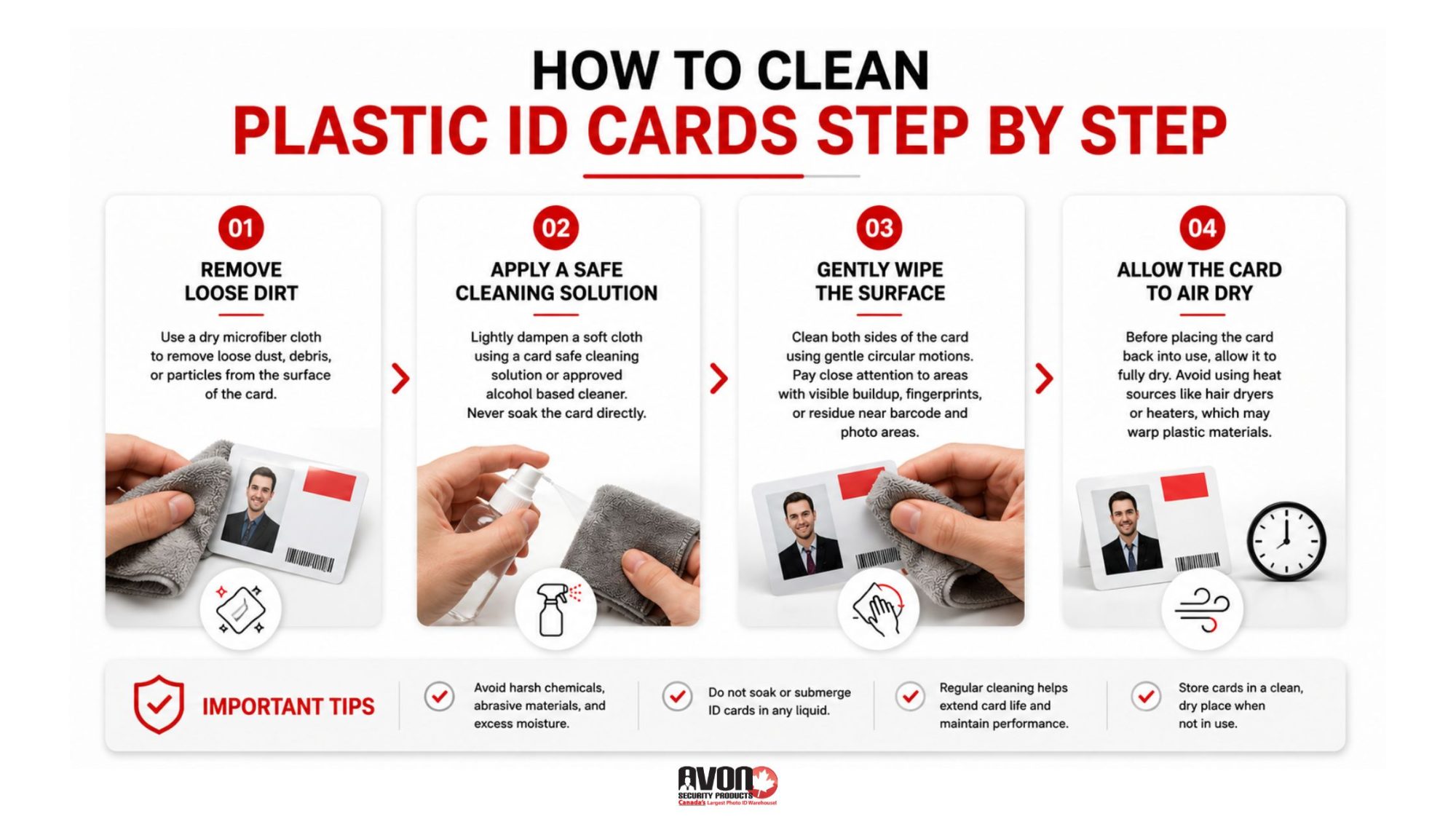
How to Clean Plastic ID Cards Step by Step
Cleaning plastic ID cards properly only takes a few minutes, but technique matters.
Step 1: Remove Loose Dirt
Use a dry microfiber cloth to remove loose dust, debris, or particles from the surface of the card before applying any cleaning solution. This prevents scratches during the cleaning process.
Step 2: Apply a Safe Cleaning Solution
Lightly dampen a soft cloth using a card safe cleaning solution or approved alcohol based cleaner. Never soak the card directly.
Kansas State University guidance on cleaning electronics also recommends limiting excess moisture and using soft microfiber materials when cleaning sensitive surfaces and electronic components. Excess liquid can seep into smart card components or damage magnetic stripes.
Step 3: Gently Wipe the Surface
Clean both sides of the card using gentle circular motions. Pay close attention to areas with visible buildup, fingerprints, or residue near barcode sections and photo areas.
Step 4: Allow the Card to Air Dry
Before placing the card back into use, allow it to fully dry. Avoid using heat sources like hair dryers or heaters, which may warp plastic materials.
Why Access Cards Require Extra Care
Modern workplaces increasingly rely on smart credentials and contactless technology. Many employee badges now include RFID chips, encoded magnetic stripes, embedded security elements, or integrated smart card technology.
Improper cleaning methods can interfere with signal transmission or permanently damage sensitive components.
This is especially true for organizations using high frequency access systems or encrypted workplace credentials.
Businesses using secure entry systems and proximity cards should avoid excessive moisture, strong solvents, or aggressive scrubbing techniques that could compromise functionality. When cards stop scanning properly, organizations often assume the card reader or software is failing when the actual problem is physical contamination or surface damage.
Your ID Card Printer Needs Cleaning Too
One of the most overlooked parts of ID card maintenance is the printer itself. Even perfectly cleaned cards can produce poor results if the printer contains dust, debris, ribbon residue, or adhesive buildup.
Dirty printers commonly cause:
Streaked print output
Color inconsistencies
Misaligned printing
Card jams
Ribbon tearing
Reduced printer lifespan
Routine printer cleaning helps maintain consistent print quality while reducing costly repairs and operational interruptions.
Organizations using an Evolis cleaning kit can safely remove internal debris and maintain optimal printer performance according to manufacturer recommendations.
Common ID Card Cleaning Mistakes Businesses Should Avoid
Many organizations unintentionally shorten the lifespan of their ID cards by using incorrect cleaning methods. Here are some of the most common mistakes we see.
Using Household Cleaning Products
Standard disinfectants and household cleaners often contain chemicals that damage card overlays and print surfaces.
The Occupational Safety and Health Administration (OSHA) also emphasizes the importance of using cleaning chemicals properly and understanding how certain substances may affect workplace materials and equipment.
Scrubbing Too Aggressively
Rough cleaning materials can scratch protective coatings and affect barcode readability.
Applying Too Much Liquid
Excess moisture can damage embedded electronics or weaken adhesive layers.
Ignoring Printer Maintenance
Dirty printers often transfer debris directly onto new cards.
Waiting Until Cards Stop Working
Preventative maintenance is significantly more effective than reactive replacement.
Organizations using regular Magicard and Polaroid printer cleaning products often experience fewer printer issues and more consistent badge quality over time.
Clean Cards Help Protect Workplace Security
A dirty or damaged card can become a security risk. Unreadable badges may delay access verification. Damaged barcodes can interfere with visitor tracking systems. Worn access cards may create confusion at secured entry points.
In healthcare facilities, schools, government buildings, offices, and manufacturing environments, reliable identification systems play an important operational role every day.
Professional appearance also matters. Employees carrying faded, cracked, or dirty ID cards can unintentionally create a poor impression for visitors, customers, and clients.
Regular maintenance helps businesses maintain both functionality and professionalism across the organization.
Dirty cards affect more than the badge itself. Dust, oils, and debris transferred from cards can accumulate inside printers over time, eventually leading to mechanical problems and inconsistent output.
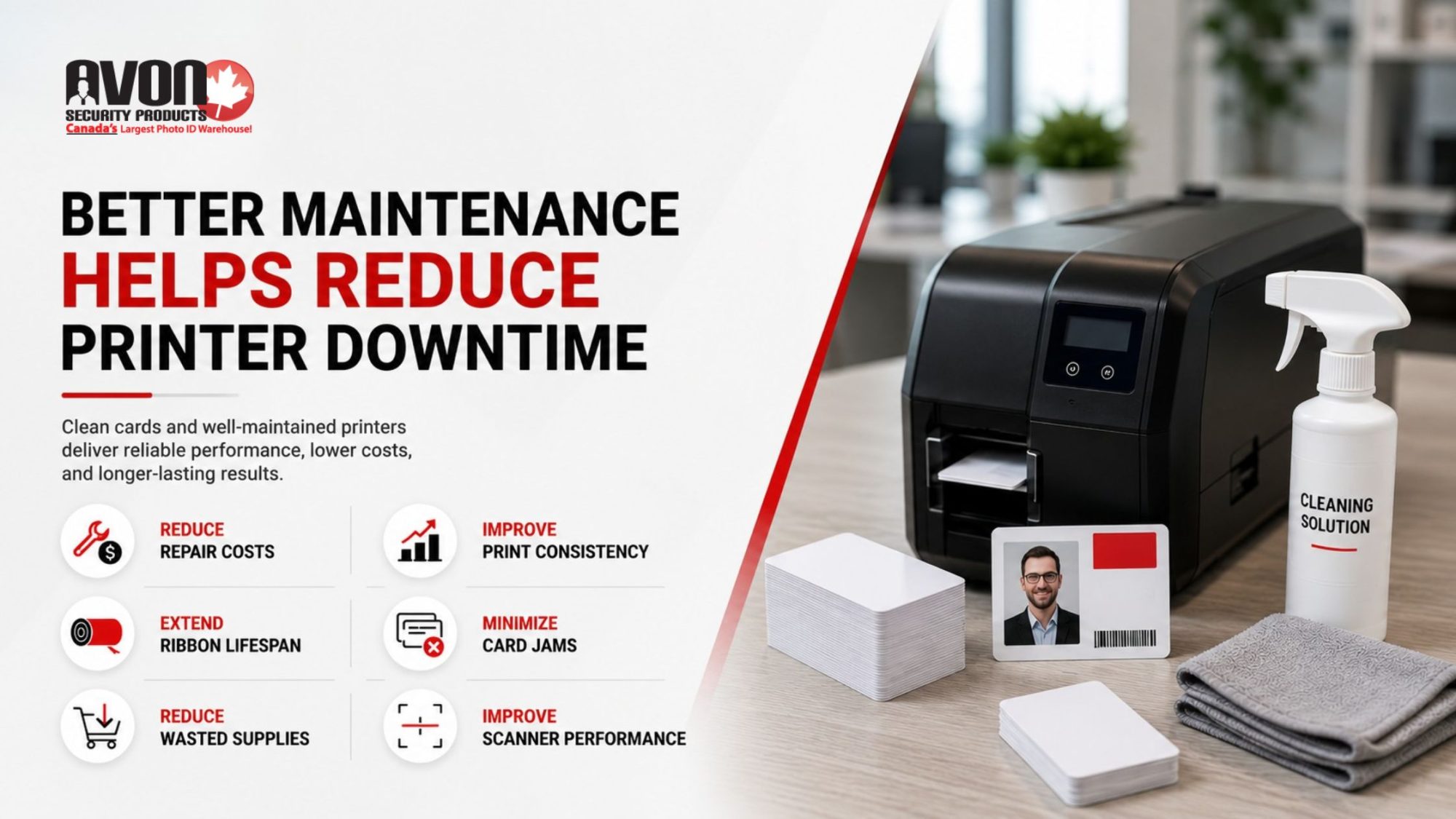
Regular cleaning schedules help businesses:
Reduce printer repair costs
Improve print consistency
Extend ribbon lifespan
Minimize card jams
Reduce wasted supplies
Improve scanner performance
At Avon Security Products, we help organizations develop practical ID card printer maintenance tips and cleaning routines that support long term reliability across their identification systems.
Key Takeaways
Regular ID card cleaning helps maintain workplace security and scanner reliability
Dirt and oils can damage both employee badges and printer equipment over time
Harsh household chemicals should never be used on plastic ID cards or access credentials
Proper cleaning techniques help preserve magnetic stripes, RFID chips, and printed graphics
Printer maintenance is equally important for reducing card jams and print inconsistencies
Durable cards and proper storage habits help extend badge lifespan
Routine maintenance reduces operational disruptions and replacement costs
Clean, readable ID cards support a more professional workplace environment
Final Thoughts
Clean ID cards support more than appearance. They help maintain workplace security, improve operational reliability, protect printing equipment, and extend the lifespan of identification systems that organizations rely on every day.
Small maintenance habits often prevent much larger operational problems later. At Avon Security Products, we help businesses maintain reliable workplace identification systems through durable cards, printer supplies, cleaning products, maintenance solutions, and practical support designed for real world daily use.
Whether your organization manages employee badges, access control systems, visitor credentials, or large scale identification programs, proper maintenance helps protect your investment while keeping your systems running smoothly.
Frequently Asked Questions
How often should employee ID cards be cleaned?
Employee ID cards should generally be cleaned every few weeks for standard office environments and more frequently in healthcare, manufacturing, education, or high traffic workplaces where cards are exposed to dirt, oils, and constant handling. Regular cleaning helps maintain print quality, scanning reliability, and card durability.
Can alcohol damage plastic ID cards?
Certain alcohol based cleaners are safe when used properly and in small amounts. However, harsh chemicals or excessive liquid can damage protective overlays, printed graphics, or embedded technologies. Businesses should always use cleaning products approved for plastic ID cards and access credentials.
Why do dirty ID cards affect printer performance?
Dirty cards transfer oils, dust, and debris into printers during the printing process. Over time, buildup inside the printer can lead to streaking, ribbon issues, card jams, and inconsistent print quality. Routine cleaning helps reduce equipment wear and improve operational reliability.
What should never be used to clean access cards?
Organizations should avoid bleach, acetone, ammonia based cleaners, abrasive cloths, rough paper towels, and excessive moisture when cleaning access cards. These materials can damage magnetic stripes, RFID chips, smart card technology, and printed surfaces.
How can businesses extend the lifespan of employee badges?
Businesses can extend badge lifespan through regular cleaning, proper storage, protective card holders, printer maintenance, and high quality printing supplies. Encouraging employees to avoid bending cards or exposing them to extreme heat also helps reduce damage over time.
Most organizations use ID cards every day without thinking much about how those cards are actually produced. Until suddenly, print quality becomes inconsistent. Security concerns increase. Cards wear out too quickly. Or an outdated printer starts slowing down operations in ways nobody can ignore anymore.
The reality is that not all ID card printing technologies work the same way. Some are designed for speed and affordability. Others focus on high security, edge to edge print quality, or long term durability. Choosing the wrong system can lead to unnecessary replacement costs, poor card performance, and frustrating workflow limitations.
At Avon Security Products, organizations across Canada rely on trusted printing solutions that support everything from basic employee identification to advanced credential programs with integrated security features and access control technology.
Inside This Guide
The main types of ID card printing technologies
Direct-to-card vs retransfer printing explained
Which printing method works best for different organizations
Hidden costs many businesses overlook
How printer maintenance affects long term performance
Signs it may be time to upgrade your current system
What to look for when comparing ID card printing systems
Not All ID Card Printing Systems Are Built the Same
There is a reason some ID cards fade after a few months while others remain sharp and secure for years. The technology behind the printer matters.
Organizations searching for reliable, high quality badge production often start by exploring different types of secure ID card printing systems that match their operational needs, security expectations, and print volumes.
The most common printing technologies include the following.
Direct-to-Card Printing
Direct-to-card printing, often called DTC printing, is one of the most widely used forms of plastic card printing.
In this process, the printhead applies colour directly onto the surface of the PVC card. It is efficient, relatively affordable, and ideal for organizations producing standard employee badges, membership cards, visitor passes, or student IDs.
Advantages include:
Faster print speeds
Lower upfront equipment costs
Simple operation for everyday badge production
Strong performance for medium to high volume printing
However, DTC printers may leave a small unprinted border around the edge of the card. They can also be more sensitive to imperfections on card surfaces.
Retransfer Card Printing
Retransfer printing works differently. Instead of printing directly onto the card surface, the image is first printed onto a clear film that is then fused onto the card itself. This creates exceptionally sharp, edge to edge print quality with improved durability and stronger resistance to wear.
Retransfer systems are commonly used in environments where security and professional appearance are especially important, including government agencies, healthcare facilities, and enterprise organizations.
Benefits include:
Full bleed edge to edge printing
Superior image quality
Better compatibility with uneven card surfaces and embedded chips
Retransfer systems typically involve a higher investment, but many organizations view that investment as worthwhile for long term credential quality and reliability.
The Hidden Costs Nobody Talks About
A printer price tag only tells part of the story. The true cost of ownership includes ribbons, replacement parts, maintenance, software compatibility, card waste, downtime, and long term support.
Organizations often underestimate how quickly inefficient printing systems create operational headaches.
Cheap printers may require more frequent repairs. Poor quality ribbons can affect print consistency. Limited technical support can leave internal teams struggling to troubleshoot avoidable problems.
That is why many organizations work with suppliers who provide not only hardware, but also ongoing access to ID card printer ribbons and supplies that keep systems operating smoothly over time.
Reliable supply access becomes especially important for schools, healthcare facilities, and businesses producing credentials daily.
Choosing the Right Printer for Your Organization
Not every organization needs the same level of security or production capacity. A small office issuing occasional employee badges has very different needs from a hospital managing thousands of secure credentials across multiple departments.
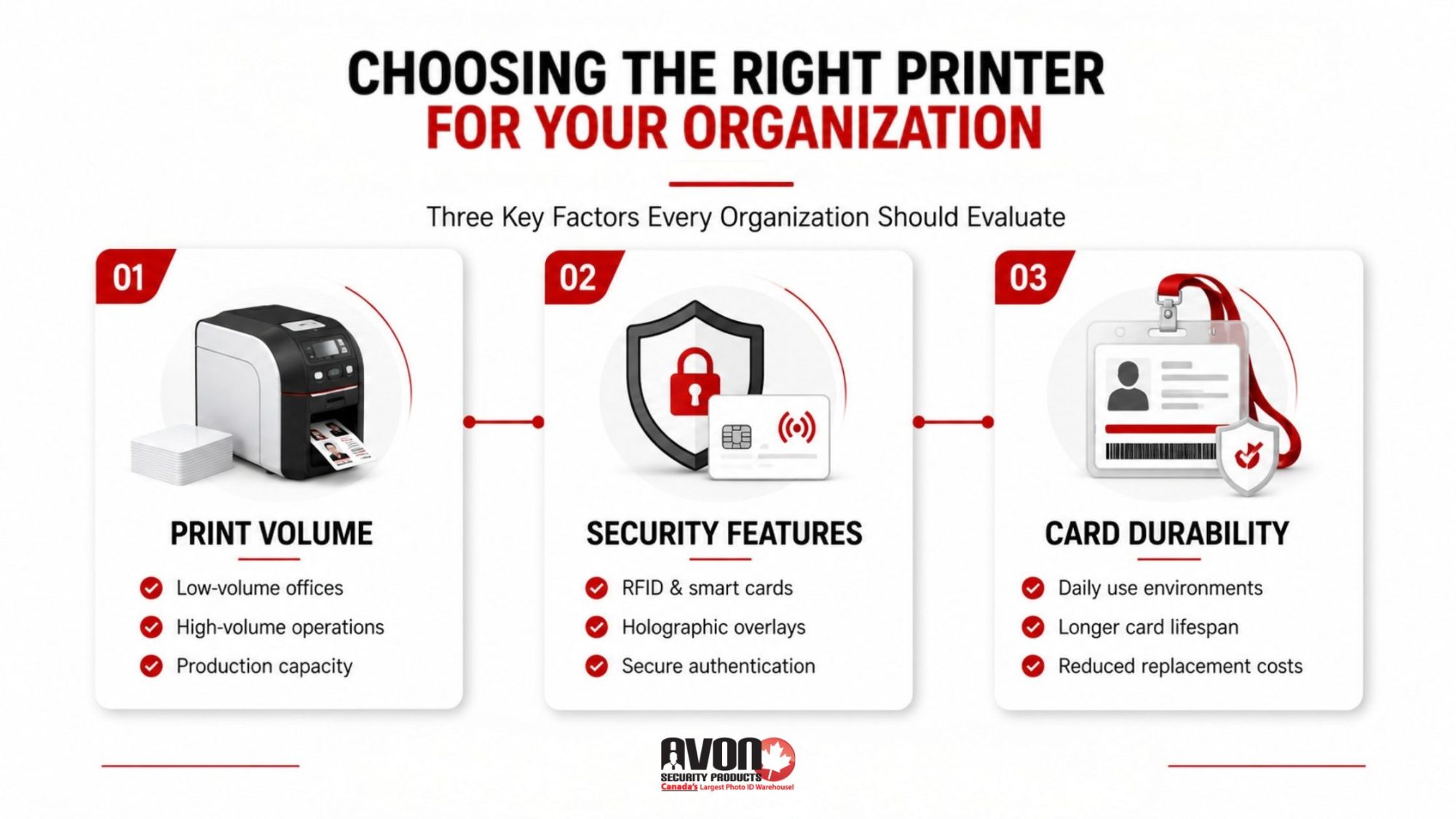
When comparing printer models, organizations should consider:
Print Volume
How many cards will be printed each month? Low volume operations may benefit from compact entry level systems, while larger organizations often require industrial grade printers capable of continuous production.
Security Requirements
Some environments need more than a simple photo badge.
The Canadian Centre for Cyber Security also recognizes identification cards, smart cards, and authorization credentials as important components of secure physical access management within organizations.
Card Durability
Cards used daily in high traffic environments experience constant handling, friction, and exposure to heat or moisture.
Higher durability printing solutions reduce replacement frequency and help organizations maintain a more professional appearance across their credential program.
Comparing Printer Brands and Models Without Getting Overwhelmed
The ID card printing market can feel crowded quickly.
Datacard. Entrust. Fargo. Zebra. Evolis. HID.
Every manufacturer promises reliability, speed, and security. The difference often comes down to workflow compatibility, ease of use, long term operating costs, and available support.
Many organizations upgrading older systems are now exploring how modern Datacard printers improve ID workflows through faster printing, simplified interfaces, improved security layers, and better integration with modern credential management systems.
The best printer is rarely the one with the longest feature list. It is the one that fits the organization’s actual operational needs without creating unnecessary complexity.
Printer Maintenance Matters More Than Most People Expect
Even the best ID card printer will struggle without proper maintenance. Dust, ribbon residue, worn rollers, and neglected cleaning schedules can affect print quality surprisingly fast.
Organizations relying on professional badge printing should prioritize:
Regular cleaning cycles
Manufacturer approved supplies
Firmware updates
Preventive servicing
Technical support access
Reliable maintenance extends equipment lifespan while helping reduce expensive downtime and emergency repairs.
Working with an experienced Canadian supplier also provides organizations with easier access to support when technical issues arise. For many buyers, the benefits of buying Canadian security products include faster support, simplified supply ordering, and stronger long term service relationships.
Sustainable and Cost Efficient Printing Is Becoming a Bigger Priority
Organizations are becoming more conscious of waste reduction, operating costs, and supply efficiency.
Modern ID badge printing systems increasingly support sustainability goals through:
Cost efficiency is no longer only about choosing the cheapest printer upfront. It is about selecting systems that continue performing consistently over time without excessive replacement or repair costs. That shift is changing how organizations evaluate printing technology investments.
When Is It Time to Upgrade Your ID Card Printer?
Some warning signs are impossible to ignore. Frequent print errors. Slower production. Poor image quality. Limited software compatibility. Difficulty sourcing supplies. Older printers can quietly drain productivity long before they completely fail.
Organizations often benefit from upgrading when:
Print quality becomes inconsistent
Security needs increase
Card demand grows
Existing printers no longer support updated software
Repair costs continue increasing
Encoding or smart card capabilities become necessary
Modern professional ID card printers offer significantly improved speed, usability, and security compared to older generation systems, especially for organizations managing growing credential programs.
The Right Printing System Should Support Your Entire Credential Program
ID cards are no longer just pieces of plastic with a photo attached. They support workplace security. Access control. Visitor management. Compliance requirements. Brand consistency. Operational efficiency.
The right printing technology helps organizations create credentials that are durable, professional, and secure without adding unnecessary complications to daily workflows.
Government agencies and secure facilities increasingly rely on structured access management frameworks, including credential based access systems outlined in official RCMP physical security guidance.
Key Takeaways
Different ID card printing technologies are designed for different security, durability, and print quality needs.
Direct-to-card printing works well for many standard identification programs because it offers fast, cost effective badge production.
Retransfer printing provides superior edge to edge quality and enhanced durability for high security environments.
Long term printer support, supplies, and maintenance significantly affect the total cost of ownership.
Modern ID card printing systems can integrate encoding, security layers, and access control functionality into one streamlined workflow.
Frequently Asked Questions
What is the difference between direct-to-card printing and retransfer printing?
Direct-to-card printing applies colour directly onto the card surface and is commonly used for standard ID badge production. Retransfer printing first prints onto a film that is fused to the card, creating sharper edge to edge image quality, stronger durability, and better support for advanced security features.
Which type of ID card printer is best for secure facilities?
Organizations with higher security requirements often choose retransfer printers because they support advanced credential technologies, holographic overlays, lamination, and encoding features more effectively. Facilities using access control systems, government credentials, or enterprise security programs typically require stronger print durability and enhanced card protection.
How long do professional ID cards usually last?
Card lifespan depends on the printing technology, card material, usage conditions, and added protection layers. Standard employee badges may last one to three years, while laminated or retransfer printed cards designed for high use environments can remain durable and readable for significantly longer periods.
What supplies are required for an ID card printing system?
Most ID card printing systems require printer ribbons, blank PVC cards, cleaning kits, software, and optional encoding components depending on the organization’s security needs. Some systems also support laminates, holographic overlays, smart card encoding, or RFID technology for enhanced credential functionality.
When should an organization upgrade its ID card printer?
Organizations should consider upgrading when print quality declines, repair costs increase, security needs evolve, or older systems no longer support modern software and encoding requirements. Upgrading often improves efficiency, reliability, and overall credential quality while reducing operational frustration caused by outdated equipment.
Choosing the Right ID Card Printing System Starts With the Right Partner
At Avon Security Products, Canadian organizations can access complete ID card printing solutions including printers, software, ribbons, blank cards, encoding options, and long term support designed to simplify every stage of badge production.
Whether your organization is upgrading outdated equipment, improving credential security, or building a more efficient badge printing workflow, choosing the right technology can make a significant difference in both operational performance and long term costs.
If your organization is evaluating new printing technology or expanding its credential program, it may be time to speak with an ID card printing specialist who can help you choose the right solution for your specific operational needs.
Published: January 19, 2022
| Updated: September 24, 2024
Author: Team Avon
It’s a new year. Before you get drawn back into work, think about how you can make your office more secure. Protecting your business, employees, and customers is one of the most important things to do. We live in a world where attackers can target web presence to steal information and money.
Cyberattacks are rising and can involve anything from ransomware to email phishing. According to the 2021 data breach investigations report of Verizon, 5,258 data breaches occurred in 16 different companies.
It’s not enough to rely on traditional security measures. In this article, we will discuss the necessity to establish security measures and how they can help you stay secure. We will also tackle why photo ID badges for employees or PVC ID cards can safeguard your business.
The Importance of Security in Business
There are increasing data breaches — more than 3.9 billion data records are lost and stolen worldwide. A new report from IBM Security stated that the cost of data breaches in Canada hit a new record in 2021. Furthermore, you wouldn’t want to risk any physical danger to your employees. Not everyone entering and exiting your building is an employee, supplier, or visitor. Ensure only authorized parties are allowed in or out of your premises.
As technology develops, so does the need for identification systems. With your company’s security on the line, it’s imperative to have the right equipment at your fingertips. A PVC card printer is exactly what you need to make high-quality identification cards that help you maintain a safe working environment. Having an ID card system in place can significantly deter theft and fraud, plus provide a professional look for your company.
What Is an ID Card System?
ID card systems will issue employees and visitors photo identification cards. The system consists of an access control unit, a plastic card printer, and a software program. Sometimes, these systems can be upgraded and customised — depending on the needs of your business. You can add lanyards, webcams, badge reels, ribbons, and more.
Why Get an Employee ID Card System?
An ID card system improves security. With an ID card system in place, security personnel can quickly detect a person’s identity before letting an individual inside the premises. The system enables the guards to verify the visitor’s name, department, and code before providing access. Here are other additional benefits of getting an employee ID card system:
It is cost-effective: Having your ID card system means you’ll be able to have your ID cards made in minutes — not hours or days. Typically, ID card printers are more expensive than the more conventional printers. But a full-featured ID card system is often less costly than purchasing all the needed supplies separately. You don’t have to go from store to store trying to find a printer that can handle that type of ribbon and the associated cost of the replacement ink.
Your company gets to build brand recognition: Offering photo ID cards means that the organization can reinforce its promotional efforts and encourage employee loyalty.
Helps with access rights: As a business owner, you can use different access levels for employee ID cards to differentiate between communal and secure work areas. It is simple to set up and administer and has excellent flexibility for changing access rights.
Allows activity monitoring: Some ID cards are programmed with passcodes. These give the ability to track and monitor their employees and their activities. One can track who accessed what area, how long they were there, and when they came in and left. Also included are timestamps for hours worked each day, providing your team with accountability and easier payroll processing.
Improves workplace relationships: IDs help each employee identify their co-workers and get the most from their teams.
How to Keep Your ID Card Safe and Secure
Know when to bring your ID card
Know when you should be wearing and bringing your ID card. This will depend on the company policies. Do you need to wear your ID card at all times? Or only when you enter the building? If you don’t need to wear your ID card, keep it in a safe and secure area. You can also use lanyards or badge reels.
Wear a lanyard
A great way to keep your ID card safe is to wear it around your neck on a lanyard. This will make sure you won’t misplace your card, and you can be confident that once it is attached to the lanyard, it won’t easily fall out during a busy day. Lanyards are also a great way to support a cause by attaching your ID card to an awareness lanyard.
Use a badge reel
Badge reels allow you to carry around your ID card without wearing it around your neck. It keeps your ID card attached to your hip so that you can swipe it with ease when needed.
Store in a safe place
Always store your ID card in the same place when not in use. That way, it will be easier to find and prevent its loss. Store your ID card in a safe place to avoid damage.
Keep in condition
Take care of your ID card properly. Store it in a safe and secure area. Ensure that it is away from any sharp object — to prevent scratches.
If you want to elevate your security this year, it is best to have a high-quality ID badge system for your company. Call Avon Security now.
“Having the best ID card system guarantees your business is safe and secured from any threats.”
– Avon Security Products
Are You Looking for the Best Employee ID Card Systems for Your Business?
Security is an ever-evolving industry. Staying on top of current developments and business security tips is beneficial for any company that seeks to protect its assets.
Having an ID card system provides many benefits. It makes the company more secure for employees and customers. It also makes it easier to control access to restricted areas. Overall, every business owner should consider using an ID card system in their workplace.
Is your business ready for the next step in security? Our complete ID card systems keep your workplace secure. We offer a variety of ID cards that meet the specific requirements of your institution. Get in touch with us today to learn about the latest employee ID card printer systems for your employees. We can help you get started in no time!
FAQs on New Year, New Security: Why and How to Elevate your Security This Year
What should an ID card contain?
Your employer will decide the information on your ID card. This may include your name, date of birth, employee number, DBS number, job title, National Insurance number, start and expiry date, and department.
What is PVC printing?
Polyvinyl Chloride (PVC) is a plastic material used in ID card printing. PVC material offers a smooth finished surface, which means colours and branding details show vividly.
How long does a PVC ID card last?
PVC cards are more durable and last longer than paper. To make sure it will last for much longer, store it properly. When not in use, keep it in a secured area and out of harm’s way.
Published: December 30, 2021
| Updated: September 24, 2024
Author: Team Avon
Thanks to the constant advancements in technology, businesses can use enhanced security systems to keep their workplace safe. A prox card, also known as proximity card, uses a low 125 kHz radio frequency to transmit access. The card can be read without inserting it into a reader or device, and it consists of a metallic antenna coil that stores the cardholder’s data.
Proximity cards are highly valuable in a fast-paced world where it may not be possible to have human interaction at all times. It is also a great way to protect your privacy, as doors will not unlock if the card’s unique numbers match the internal database. Here are some reasons you should implement prox cards at your workplace.
Limit Unauthorized Access to Buildings
A proximity card system allows you to stop unauthorized people from entering your workplace. Since only individuals with a personalized prox card can enter your work premises, there is a lower risk of facing a data breach, theft, or other violations of privacy.
Limiting public access to your building also helps your employees and customers or clients feel safe inside your workspace. Simple employees spend a lot of time at the office, and it can be beneficial to ensure that they feel secure at all times.
Hold Records of Access List
If something goes wrong at your workplace, it can be helpful to know who might have been present in the office during that time. You can program your cards to gather information to figure out who accessed the area at what time based on the card numbers.
You can also use the data to create reports and audits without putting too much effort into it. In addition, it can also be helpful to track employee records and trends. Prox cards might motivate staff members to take work start time seriously and reduce unnecessary breaks. Instead, you can encourage them to take breaks in a strategic manner to boost productivity.
Save Cost of Hiring Security Personnel
When you use proximity cards for security management, you save the cost of hiring security personnel. Although having someone at the front desk can be very helpful for security, it can also be costly.
Since a prox card allows people to enter a building through a tap or scan, it eliminates the requirement of security personnel in some cases. Investing in a proximity card system once will allow you to save on a recurring security personnel cost.
Reduce Risk of Duplicating Key
Although locks and keys are a standard security procedure, sometimes keys may get misplaced or duplicated. A duplicate key will grant access to strangers into the building who may target the company for a data breach. However, proximity cards reduce that risk since you cannot copy the unique numbers from the card because each card is personalized.
You can choose from a range of prox cards depending on the type of technology you need. One key benefit of a proximity card is that the technology can be invisibly embedded into an ID card, so thieves or intruders cannot identify the technology quickly.
Proximity cards are an excellent way to ensure your company remains secure at all times. Learn more about the technology, and you’ll be more step closer to a safer workplace.
Published: December 30, 2021
| Updated: September 24, 2024
Author: Team Avon
The holidays come with joy, gifts, and many new memories, but security risks may also accompany them. For many companies, business starts to boom during the holidays, requiring additional staff members. Although the extra help can ease your mind, it might also be stressful to worry about whether they are genuinely worthy or not.
You may overlook some aspects of your business while ensuring that everything runs smoothly. Here are some holiday security risks you can avoid by using a plastic ID card printer before the season approaches.
Overcrowded Areas Leading to Theft
Whether you work in an office or store, your workspace might become overcrowded during the holidays. You can benefit from limiting visitors to your workplace to reduce the risk of theft. It can be challenging to manage a crowded area without ID cards. Implementing an ID card system will allow you to control how many people enter each area.
If your workplace encounters a theft or similar incident, it can be easier for you to identify the criminal when ID cards are in place. Without identification, you may not be aware of who is entering your premises.
Risk of Data Breach Due to Seasonal Staff
You may hire temporary workers during the holidays to tackle the busy period. However, since your company won’t have enough time to look deeply into the background of every staff member, you might face difficulties if any of them are not loyal. Use a temporary ID card for every seasonal staff member to reduce the risk of a data breach or theft.
Providing temporary ID cards to seasonal staff will ensure that the employees don’t enter the building after the short-time staffing period ends. Temporary ID cards will expire after a specific time, enabling you to rest assured that the risk of a data breach is lower.
Exposure to Scams Due to Employee Error
When you hire someone new, they might not be as qualified as your current employees. However, without ID cards, it can be challenging to track who made an error if an unfortunate event occurs.
Cybercrime is a primary culprit of most data breaches that can tarnish a company’s reputation and result in high costs. Unfortunately, the simple error of clicking on a suspicious link can allow hackers to enter the system and cause numerous problems.
For example, if someone clicks on a phishing click that results in a significant security risk for your company, it can be tough to identify who caused the issue. But, making sure your staff members scan their ID cards at the door before using any computer will help you identify who might be responsible.
Take your time to follow some helpful workplace security tips to secure your company this winter. Prepare your temporary ID system ahead of time to prevent downtime after your staff members arrive for work. Enter the season with complete protection and leave the security risks associated with the holidays behind. So, you can spend your time on events that you enjoy instead.
×
1
Product selection
2
Contact information
3
Review information
How many cards will you print a year?
Organizations needing to print less than 25 cards per year may find it more economical to use a card printing service.
Automatically print on both side of the Card?
Dual-sided printers usually cost significantly more than single-sided printers. In some cases a single-sided printer can be used to print both sides of an ID card:
If the back of every card is identical (i.e.: If lost, return to... This card is property of...), you can use a single-sided printer and pre-print a batch of card backs, often using an inexpensive black ribbon. Those cards can be sent through the printer a second time to include customized information on the other side. This method is not recommended for printing on technology cards due to possible damage it could cause to the card.
Even if the back and front is unique for every card, you can print one side of an ID card, flip it over and print the back. This is much more time consuming, and is not recommended for organizations that print a large volume of ID Cards. This method is also not recommended for printing on technology cards due to possible damage it could cause to the card.
Need to use the printer with an Apple MacTM?
Only a few models of ID card printers on the market are compatible with Mac computers.
There is currently not any commercial ID card software that is compatible with Mac computers. If at all possible, we recommend using a PC to manage an ID card system.

 1.866.458.6999